
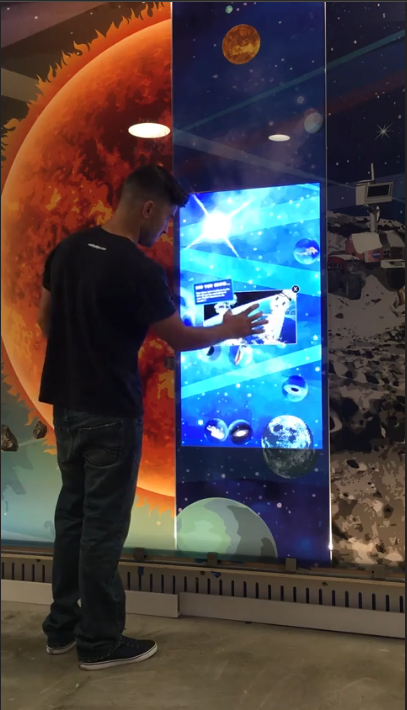
A shared screen works best when several people can reach it at once. Touch foil makes that possible on surfaces people already gather around: a glass-topped table, a glass partition in an office, or a glass wall in a lobby or classroom. The foil mounts on the inside of the glass, so the surface people touch stays smooth, hard-wearing and easy to wipe down.
Why multi-touch matters for groups
The number of touch points decides how many hands can work on the screen at the same time. ProFoil Standard handles 10 touch points, which suits one or two people. ProFoil Pro Touch moves to 20 or 40 touch points from 32 inch up, so a small team can sort, zoom and annotate together. ProFoil Object Recognition handles 40+ touch points and also recognises marker pucks placed on the glass, which is useful for planning tables and hands-on exhibits.
Touch tables
A touch table puts a display or projected image under a glass top with the foil on its underside. People stand or sit around it and work on the same map, plan or product catalogue. For round tables and domes, Circular Touch Foil covers up to 140 cm of active diameter, and two halves join to 280 cm. With Object Recognition, a puck placed on the table can open a menu, select a building on a site plan or start a video.
Glass walls and partitions
Many offices, schools and visitor centers already have glass partitions. Put a display behind the glass, or use a projector with rear-projection film, add the foil on the inside face, and the wall becomes a shared screen for room bookings, wayfinding, timelines or presentations. Pro Touch works through glass up to 12 mm, including laminated double glass with no air gap, and comes in sizes up to 100 inch. Larger walls can use custom sizes up to 1.4 x 4.5 m.
Meeting rooms and classrooms
Because the foil is plug-and-play over USB, the room computer sees it as a normal touch screen. Teams can use the whiteboard, map or presentation software they already know. The foil adds no visible bezel to the glass, and ProFoil Clear has no visible wires at all, which helps in spaces where the glass should look untouched when the screen is off.
Planning a shared touch surface
- Count the people who will use it at once and choose the touch points to match.
- Check the glass: no metal in it, metal at least 3 mm from the foil, and thinner glass gives better touch.
- Decide on the image source behind the glass: an LCD or LED display, or a projector with rear-projection film.
- Plan grounded power, a fixed and grounded controller, and a USB route away from power and display cables.
- Test the layout before installing: the foil is wet-applied, dries in 24 to 48 hours and cannot be moved to another pane.
Touch accuracy is about plus or minus 2 mm (under 1 mm on Object Recognition) with a response under 10 ms. Foils carry a 3-year warranty and the controller 1 year. See How It Works and Sizes and Specs for details, then get a quote with your table or wall size and glass thickness.
Planning a touch project?
Tell us about your glass and screen and we will recommend a foil.