
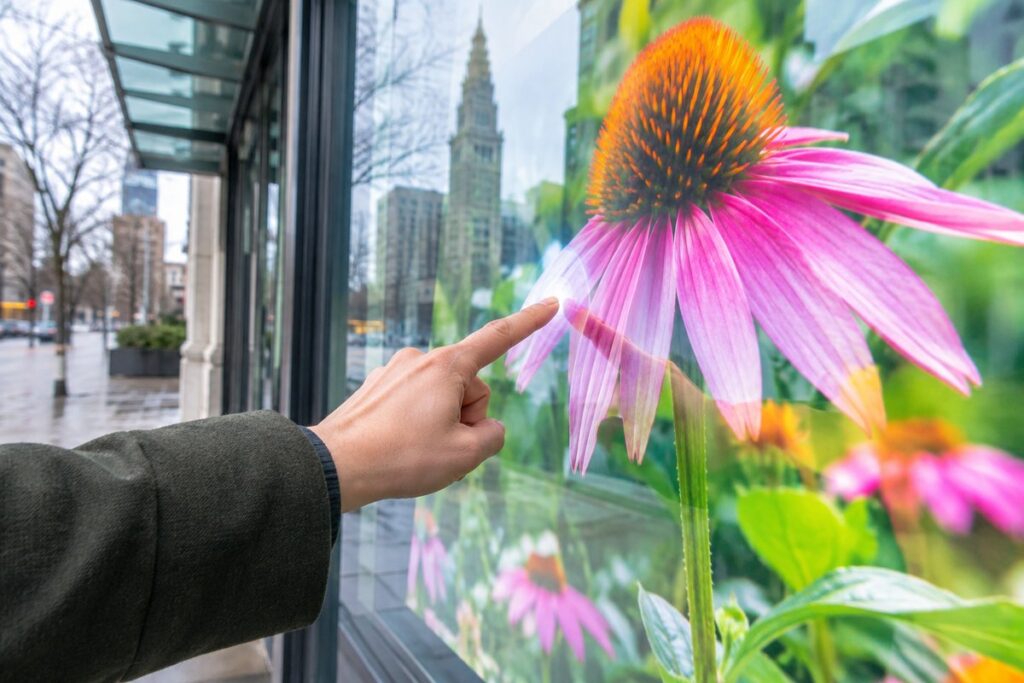
What Is Touch Foil? The Basics for Cleveland Businesses
Touch foil is an advanced technology that allows almost any regular pane of glass or acrylic to function as a multi-touch interactive screen. It consists of a transparent film embedded with a fine grid of sensing wires—completely invisible in some models, such as ProFoil Clear. When mounted on the inside of a window, retail display, or kiosk surface, it senses fingers or objects through the glass, making it possible to provide interactive experiences without exposing electronics to public touch. The technology is plug-and-play, powered by 5 V over USB, with a controller and USB cable included in each kit.
For businesses in Cleveland, touch foil presents possibilities ranging from interactive storefront windows to museum kiosks and interactive tables. The touch foil itself is always installed on the inside of the glass or acrylic, which protects the delicate film from vandalism, weather, and accidental damage. The system is compatible with LCD/LED displays or projectors behind the glass, making it adaptable for a range of environments common to Northeast Ohio.
Used in conjunction with an interactive software package or custom apps, touch foils can serve a wide array of sectors: retail, museums, corporate offices, higher education, real estate, and more. This versatility opens new ways for Cleveland organizations to engage customers, visitors, and students in a hands-on manner that is secure, robust, and visually unobtrusive. For specific model details and capabilities, see Touch Foil Models.
How Touch Foil Works: Turning Glass Into a Touch Screen
A touch foil is a thin, transparent sheet placed on the inside of a glass or acrylic panel. It is equipped with a fine grid of conductive wires—though the ProFoil Clear version features no visible wires for complete clarity. When a finger or special object makes contact on the opposite side of the glass, the foil detects the precise location, transmitting this position to the controller, which sends the data to your computer or media player. The touch accuracy is typically within ±2 mm, and response time is under 10 ms, delivering a natural multi-touch experience for users.
Behind the touch foil and glass, you install either an LCD/LED display or a projector (with rear-projection film applied to the glass). This setup ensures a bright and sharp interactive surface, while the actual display technology is safely positioned inside. Light transmission through the touch foil is 89% or more (85%+ for ProFoil Clear), so display brightness and clarity remain strong even in sunlit Cleveland storefronts or galleries.
The foil is available in multiple models, each with specialized features: standard foils, foils with object recognition for multi-user and educational applications, full transparency models, and even circular foils for tables and domes. Whatever the experience envisioned, there’s a configuration that aligns with your needs. Read more about sizes and specs at Touch Foil Sizes and Specifications.
Display Options: LCD, LED, and Projection Behind the Glass
There are two primary ways to create an interactive touch screen using touch foil in Cleveland:
- LCD/LED display behind glass: The touch foil is installed on the inside surface of the window or acrylic, and an LCD or LED screen is placed behind the glass. This is a popular option for retail storefronts, real estate offices, and lobbies. The system connects to your computer or dedicated player, allowing visitors to browse content, explore maps, or interact with information.
- Rear projection with projection film: For larger surfaces or custom shapes, a projector mounted inside the space projects an image onto the rear side of the glass, where rear-projection film is applied. The touch foil is installed on the inside as always, and the display area can be massive. This method is ideal for museums, exhibit builders, or venues wanting flexibility in screen size and shape. For detailed info on compatible projection film, see the sister site at RearProjectionFilms.com.
In Cleveland’s bright or changing light conditions, consider the placement and brightness of your chosen LCD/LED or projector. Many venues combine proper lighting and display calibration for optimal results, especially in street-facing windows. For technical guidance on setup and integration, How Touch Foil Works and How to Install It provides a step-by-step walk-through.
Planning Glass Thickness and Sizing for Touch Foil
Choosing the right glass or acrylic is essential for reliable touch through glass. Touch foil can sense inputs through glass thicknesses up to 10 or 12 mm (model-dependent; Pro Touch 20/40 works with up to 12 mm including laminated glass with no air gap). Thinner glass generally delivers better touch sensitivity and a more responsive user experience. Be sure the glass contains no metal—metallic tints, mesh, or wire can disrupt touch sensing. For laminated glass in high-traffic areas, always confirm compatibility prior to purchase.
For project planning in Cleveland, measure the intended display area and check the exact active touch region needed. Touch foils are available in custom sizes up to 1.4 x 4.5 meters and many standard options from 10.1 up to 100 inches, including round and specialty shapes. The active area must match your display’s visible screen. Models such as the ProFoil Standard offer automatic calibration, while Pro Touch 20/40 includes deeper calibration options for multi-user support and larger areas.
To ensure your installation meets relevant safety standards for glass in public areas, consult Cleveland’s construction and building requirements. Commercial installations often require permits for modifications to doors, windows, or storefront structures; for up-to-date guidance, visit Construction Permitting.
Mounting and Installing Your Touch Foil in Cleveland
Proper installation is critical for touch foil performance and longevity. The foil is wet-applied to clean, oil-free glass using a water-based application solution. After unrolling, the marked active area is aligned with the edges of your display, water and air bubbles are squeezed out gently, and the foil is left to dry for 24 to 48 hours. Because touch foil is a one-time install and cannot be moved, always perform a full test fit before starting permanent application. Installation requires no adhesives except water, and it is essential to follow the procedure outlined in How Touch Foil Works and How to Install It.
Keep all metal at least 3 mm away from the active touch area, and never use glass with embedded metal or mesh. Use grounded power for connected displays and controllers, and ensure the controller board is mounted and grounded to the frame for safety and stable performance. Run the USB cable separately from high-voltage power and display wires to reduce interference and ensure a crisp, responsive touch experience.
For installations facing Cleveland’s variable climate, keep all electronics and the foil on the interior side. This shields sensitive components from condensation, snow, or extreme temperatures, and aligns with typical safety codes. Plan for clean, dust-free conditions and check with local permitting offices when altering storefronts or major entry points.
Which ProFoil Model Fits Your Cleveland Project?
Each ProFoil model from SSI (via TouchFoil) is built for different scenarios and user needs. All are CE and RoHS compliant and include a 3-year foil and 1-year controller warranty. Here’s a quick guide to the current selection:
- ProFoil Standard: Ten simultaneous touch points, works through glass up to 10 mm, automatic calibration, sizes from 10.1 to 55 inches—ideal for retail and office displays.
- ProFoil Pro Touch 20/40: Ten points under 32 inches, 20 or 40 points from 32 inches up, supports multi-user applications and Mac OS for supported features, through 12 mm glass or laminated double glass with no air gap, sizes up to 100 inches. Includes zone calibration and larger multi-user support for educational, public or collaborative installations.
- ProFoil Object Recognition: Offers 40+ touch points through glass up to 10 mm, 43-75 inch range, recognizes marker pucks on the glass for creative and educational exhibits, with an SDK for custom software or turnkey packages.
- ProFoil Clear: Ten touch points, fully transparent (no visible wires), for pristine-looking installations—available up to 98 inches, supplied laminated on glass, for highest-end museum or style-driven upgrades.
- Circular Touch Foil: For round tables and domes, up to 140 cm active diameter, can be joined to 280 cm, perfect for collaborative tables or unique lobby features.
Custom shapes and sizes are available for creative or space-constrained installations. For more specifics, see the full selection at Touch Foil Models and explore Touch Foil Sizes and Specifications.
Integrating Interactive Storefronts With Cleveland’s Local Resources
Interactive windows and kiosks are powerful tools for attracting both local Clevelanders and visitors. Whether you are a retailer on Euclid Avenue or curating a museum experience near University Circle, blending technology with regional resources boosts engagement. Cleveland’s dynamic tourism industry, represented at What We Do at Destination Cleveland, provides valuable insights into visitor interests and trends. Consider how your interactive display can support local culture, events, or discovery, drawing in both residents and tourists with relevant content.
When planning permanent installations, it’s important to align your project with Cleveland’s regulations and permitting processes. Whether retrofitting a historic storefront or updating a new-build lobby, structural modifications may require review or approval. Plan for straightforward integration of power and network cables to support your multimedia needs, and design displays to withstand frequent use from public audiences.
Interactive displays enhance wayfinding, highlight local destinations, and drive foot traffic. Real-estate agencies might use interactive window displays to feature rotating properties, while educational institutions can provide digital campus tours accessible through glass. The right touch foil turns any window or glass wall into a compelling experience—and, with the correct permits (Construction Permitting), keeps your project compliant and operational.
FAQ: Cleveland Touch Foil Projects
What steps are needed to install a touch foil on my storefront?
Installation is a precise process: measure your glass and display area, select the correct foil model and size, clean glass thoroughly, and test placement before application. Wet-apply the foil to the inside of the glass, align the active area, squeeze out air and water, and let it dry for 24–48 hours. For clear instructions, see How Touch Foil Works and How to Install It. Always check with Cleveland’s permitting office if you plan to modify exterior glass or electrical systems.
How do I choose glass or acrylic for my interactive kiosk?
Thin, metal-free glass (up to 10 or 12 mm, depending on model) offers best touch performance. Avoid glass with wire or metallic tint. For spaces with heavy use, consider laminated safety glass, but consult with your vendor and look for permits or safety code information at Construction Permitting.
Can I use touch foil to support Cleveland tourism or events?
Yes. Interactive storefront windows, wayfinding kiosks, and museum information points can inform and engage both residents and visitors. To align content with local interests, review current initiatives at What We Do at Destination Cleveland.
Next Steps: Design Your Cleveland Interactive Display
Touch foil unlocks a world of interactive possibilities for Cleveland’s businesses, museums, schools, and lobbies. Whether your goal is to create a digital storefront, dynamic information kiosk, or touch table for collaborative work, planning starts with understanding your options and local requirements. Use the resources linked above to prepare for permitting, glass selection, and content strategy.
To receive expert advice and a custom quote tailored to your project specifications and space, Get a quote today.