
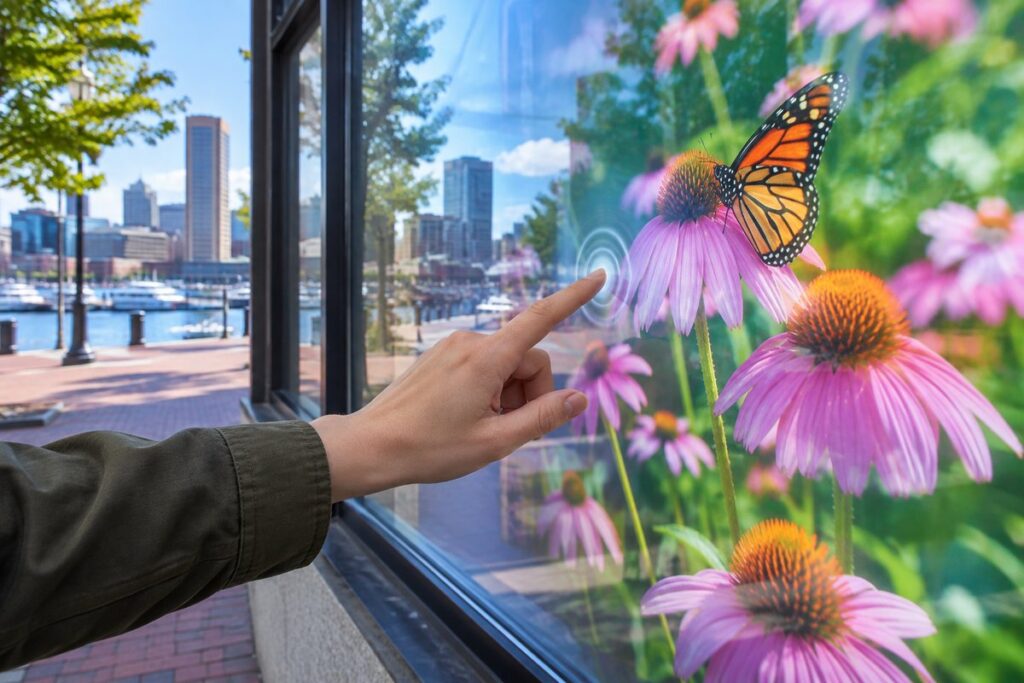
What Is Touch Foil? The Basics for Baltimore Designers
Touch foil is a transparent film embedded with a fine sensing grid that mounts on the inside of glass or acrylic to create an interactive, multi-touch surface. For Baltimore’s retailers, museums, schools, and real estate offices seeking innovative ways to engage passersby, this technology turns any standard glass window, table, or wall into a responsive touch screen. This can be essential for increasing foot traffic on the Inner Harbor or modernizing visitor experiences in local attractions.
The sensing grid in touch foil is nearly invisible—on ProFoil Clear models, there are no visible wires at all—ensuring display content remains crisp and unobstructed. Touch gestures made by users are detected through the glass, even when mounted on thick panels, and relayed to a connected computer for interaction. This technology is designed to give businesses in Baltimore an edge with interactive storefront window solutions that stand out in competitive retail corridors like Charles Street or Fells Point.
Touch foil is available in several models and sizes—including circular versions for touch tables, and special foils for object recognition applications in educational settings. For a detailed comparison of available options, see the Touch Foil Models page.
How Does Touch Foil Work?
Installing a touch foil involves mounting the transparent film on the inside of a glass surface. The key component is a fine array of sensing wires: these detect finger movements through the glass, which are then processed by a small controller included with every foil. The controller connects via USB and is powered from a standard 5 V USB port, so no special power supply is required—just plug and play with your computer.
The foil itself is wet-applied to pre-cleaned glass, with the marked active area carefully aligned to the screen or projection area. All mounting must be done inside the building, as the technology is not rated for direct outdoor installation. Once in place, water and bubbles are squeezed out, and the adhesive layer needs 24 to 48 hours to cure and dry—making advance testing critical, because foils are not designed to be moved to another pane after installation.
To understand the science behind touch through glass, and see tips for ensuring a smooth installation, read How Touch Foil Works and How to Install It.
What Goes Behind Touch Foil? Display Options for Baltimore
Touch foil alone does not display content—it senses touch. To create an active kiosk or interactive storefront window, a bright display is needed behind the glass. There are two main approaches used in Baltimore retail, museum, and university projects:
- For sunlight-heavy areas: Place a high-brightness LCD or LED display behind the glass. This is common in street-facing spaces where visibility is crucial.
- For flexible or large-format installations: Use a projector behind the glass, along with rear-projection film (such as from SSI’s RearProjectionFilms.com). This works well for larger wall displays or architectural glass features in lobbies and atriums.
In both cases, the touch foil is always applied to the inside surface of the glass, while the display or projection setup sits safely inside, protected from weather and foot traffic. For a summary of all available foil sizes and compatible glass thicknesses, view Touch Foil Sizes and Specifications.
Choosing the Right Touch Foil Model
Baltimore projects benefit from a selection of touch foil models to match project size, interactivity requirements, and mounting needs.
- ProFoil Standard: Supports 10 touch points and works through glass up to 10 mm thick (10.1–55 inch sizes, with automatic calibration for straightforward installs).
- ProFoil Pro Touch 20 / 40: Offers greater touch counts (20 or 40 points from 32 inch up, 10 points below), works through glass up to 12 mm including laminated glass, and is available for screens up to 100 inches. The 40-point version even supports macOS multi-touch where permitted.
- ProFoil Object Recognition: Ideal for interactive tables and learning environments, this model recognizes special marker pucks for educational games, museum guides, or collaborative tasks (with an SDK for software developers).
- ProFoil Clear: Fully transparent with no visible grid, up to 10 mm glass, for interior architecture or premium displays.
- Circular Touch Foil: Designed for round tables and dome installations, supporting sizes up to 140 cm (joinable to 280 cm diameter for large collaborative tables).
Custom sizing is available up to 1.4 x 4.5 meters—enough for glass walls or large storefronts in high-traffic Baltimore zones. To compare features side by side, use the resources at Touch Foil Sizes and Specifications.
Planning for Glass Thickness, Size, and Electrical Requirements
The type of glass or acrylic, its thickness, and its environment all shape touch foil performance. Thinner glass panels (within the specifications for each model) offer better touch sensitivity. Ensure the glass is non-metallic—Baltimore’s historic districts or commercial cores sometimes feature decorative or laminated glass, so verify there is no embedded wire or metal mesh. Laminated double glass is supported with Pro Touch models, as long as there is no air gap, but you should always review the exact requirements with a project consultant.
Another key factor is electrical safety and performance. Always use a grounded power supply, fix and ground the controller to the window frame (aluminum frames are common in Baltimore renovations), and route the USB data cable away from power and high-voltage display lines to minimize interference. Metal should never come closer than 3 mm to the foil’s active area, which is especially important in modern refurbishments or when adding screens to older buildings.
If you’re unsure about which combination of foil and display meets your space and design goals, check the sizing and model comparison details on the Touch Foil Models page.
Permitting, Lighting, and Local Considerations in Baltimore
Installing interactive glass in Baltimore’s varied architecture—whether Fells Point retail, Inner Harbor museums, or Charles Street lobbies—often involves more than purely technical planning. For locations in historic or mixed-use buildings, always check with the relevant permitting office before modifying storefront glass, particularly when new electrical connections or major signage changes are involved. The specific requirements and codes will vary by district and building type and should be confirmed for each project.
Lighting is crucial for high-touch environments. Buildings exposed to strong sunlight may need high-brightness displays or shaded projection to keep content visible behind touch glass. For museum displays or indoor kiosks, ambient light can be adjusted with simple retrofits or by consulting a local lighting designer.
Weather is less of a concern for the foil itself, since it’s always installed inside; however, external glass temperature or condensation should be considered, particularly in older or uninsulated storefronts found in central Baltimore. Taking professional advice early can help protect all technology investments.
Care, Compliance, and Warranty Information
For any public-facing touchscreen in Baltimore, compliance and maintenance are important. All TouchFoil products are CE and RoHS compliant and shipped with both a touch foil controller and USB cable included—making integration simple for AV teams or exhibit builders. Cleaning should be done with a soft, non-abrasive cloth on the glass surface after installation.
Each ProFoil touch foil is covered by a 3-year foil and 1-year controller warranty. The films are designed for one-time installation; if installed correctly and not relocated, they offer reliable touch response with accuracy of about plus or minus 2 mm (under 1 mm for Object Recognition foils) and light transmission of 89 percent or more (85 percent or more for Clear models). Response time is under 10 milliseconds for a fluid, responsive experience.
Consult the Touch Foil Models or Sizes and Specifications pages for current technical data and compliance details.
FAQ: Touch Foil Storefront Installation in Baltimore
Can touch foil be installed on any glass or acrylic surface?
Touch foil works on most non-metallic glass and acrylic surfaces, but the glass should have no embedded metal and should be within the thickness limits of the chosen foil model. Complete details are available in the installation guide.
Is it possible to move a touch foil after installation?
No—the adhesive is designed for one-time application. It is important to test placement with the display setup before proceeding to install the foil on the window, kiosk, or table surface.
How do I choose between rear-projection and LCD/LED for my project?
For projects where space behind the glass is limited, LCD or LED displays are convenient. For very large screens or shaped heritage glass in Baltimore museums and lobbies, a projector with rear-projection film may offer more flexibility.
Getting Started with Touch Foil in Baltimore
Touch foil transforms ordinary glass into an interactive portal for retail, education, and public displays, offering new ways to engage people in Baltimore’s bustling neighborhoods and cultural sites. Whether you are exploring an interactive kiosk touch foil for your Mount Vernon visitor center, or planning an interactive storefront window along Harbor East, start by reviewing your project requirements and space constraints. Compare models, sizing, and compatibility at Touch Foil Models and Touch Foil Sizes and Specifications.
Ready to plan your Baltimore interactive glass screen? Get a quote for your project today.