
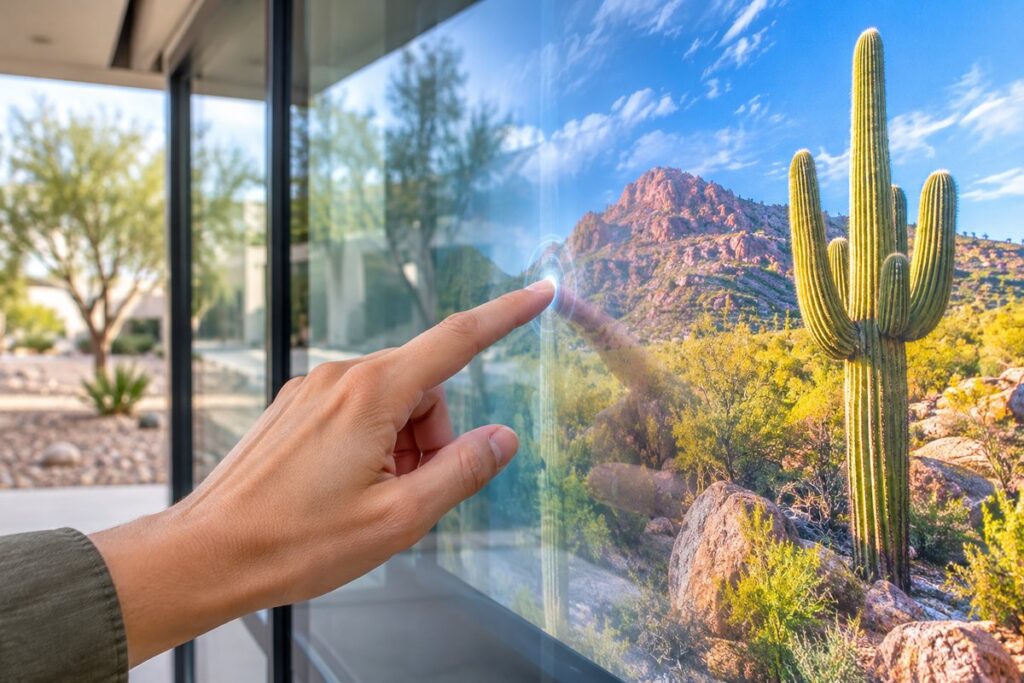
Introduction: What Is Touch Foil?
Innovative businesses, educators, and venue designers in Phoenix have a practical way to turn ordinary glass into interactive technology: touch foil. Touch foil is a transparent film that mounts directly on the inside of glass or acrylic, containing a fine grid of sensing wires (which are invisible in ProFoil Clear) that lets users interact naturally just by touching the surface from the other side. When paired with a display or projection, any window, tabletop, or wall can become a dynamic touch screen—without ever exposing electronics to the outdoors. With reliable multi-touch support and a design compatible with retail, museum, hospitality, and educational spaces, touch foil opens up a new range of creative options for interactive installations.
The entire installation sits safely behind a pane of glass. That means interactive storefront windows, wayfinding kiosks, digital directories, or touch tables can all be operated through the glass surface—keeping the display protected while delivering a seamless experience to the public or your staff. As Phoenix favors sunlit spaces and clean, maintenance-friendly design, touch foil is particularly well-suited to local needs. If you’re just beginning to learn about this technology, this guide explains exactly how touch foil works and how to plan your project for success in the Valley’s climate and building environment.
How Touch Foil Works
The core of a touch foil system is the transparent sensing film, which is applied to the inside of the glass. This film embeds a fine, transparent grid of sensing wires—completely invisible if you choose the ProFoil Clear model—capable of registering finger touches right through the glass or acrylic. The foil connects to a compact controller board and a USB cable, which powers the system with 5 volts (no extra power required). This setup works as a plug-and-play touch screen, recognizing multiple fingers at once depending on the model chosen. All product options, sizes, and interactive capabilities are detailed on the Touch Foil Sizes and Specifications page.
For a complete interactive experience, you’ll also need a display behind the glass. You can use either an LCD or LED screen, or build a projection setup using a projector, rear-projection film, and computer. Touch input is sensed directly through the glass, so users interact as if touching the image itself. When installed properly, touch foil transmits 89% or more of the display’s brightness (ProFoil Clear delivers 85% or higher), creating clear, vivid visuals for interactive storefront windows, kiosks, or tables even under bright Phoenix daylight.
Response time is quick—under 10 milliseconds—with touch accuracy typically around 2 millimeters, or under 1 mm for the Object Recognition model. The system is CE and RoHS compliant, ensuring it meets important standards for safety and materials handling.
What Goes Behind the Glass?
Choosing the right display technology is critical for an effective touch foil installation. You have two principal options. The first is to combine the touch foil, glass, a rear-projection film, and a projector. This approach is popular for life-sized storefront displays, temporary exhibits, or very large surfaces, as it allows for bigger screens without the bulk of a physical monitor. Check with RearProjectionFilms.com for compatible projection surfaces designed to be paired with touch foil, and ensure you have appropriate site conditions for projection—controlled light, space behind the glass, and simple servicing.
The second approach is to use an LCD or LED display positioned behind the glass with the touch foil applied to the glass’s inside surface. This produces a crisp, bright interactive image suitable for high-traffic areas, lobby directories, or educational kiosks. Since the foil sits between the public and the actual screen, it’s far easier to clean and maintain, particularly in Phoenix’s dust-prone or busy pedestrian environments.
Regardless of your choice, you must plan for a computer to drive the content and manage the touch input, and ensure all connections—USB, power, and display cables—are carefully routed per guidance on the How Touch Foil Works and How to Install It page. As always, follow best practices for electrical safety and consult facilities teams or IT professionals to verify your installation’s compliance and long-term reliability.
Glass Thickness, Size, and Compatibility
Glass selection is vital to maximizing touch accuracy and system performance. Thinner glass (as thin as safely practical for your application) improves touch sensitivity. Most ProFoil models work through standard glass up to 10 mm thick, while Pro Touch 20/40 models work through up to 12 mm, including certain double-laminated panes with no air gap. Always ensure the glass contains no metal and is free of coatings or films that might interfere with the foil’s sensing grid. To deliver consistent touch performance, metal spacers, frames, or features must be kept at least 3 mm away from the foil’s active area.
For round tables, domes, or unique architecture common in Phoenix’s museums or hotels, Circular Touch Foil offers a solution for active diameters up to 140 cm, with options to join two halves for as much as 280 cm in diameter. Custom touch foil sizes up to 1.4 x 4.5 meters are available and can be quoted for larger projects. Find all details on possible sizing on the Touch Foil Sizes and Specifications page.
Planning the size of your foil and glass is both a design and permitting question. Larger installations or architectural changes may require city review—for all exterior, structural, or ADA-compliant work, check the Construction Permits and Planning resource for permitting guidance. Your glass contractor should be consulted early to ensure safety and compliance in both new builds and retrofit upgrades.
Planning for Phoenix Climate and Local Codes
The Arizona climate brings intense sunlight, temperature shifts, and sometimes dust or monsoon moisture. Fortunately, because the touch foil mounts on the inside, it is fully shielded from outdoor exposure, making it suitable for most Phoenix storefronts and lobbies. Still, project planning should account for heat load on displays—especially if using projection systems behind glass facing strong sunlight. Consider appropriate cooling or shading as needed to protect sensitive AV equipment over time.
Electrical installation should always follow local code and best practices for safety. Use grounded electrical power, fix and ground the foil’s controller board securely to the display frame, and route USB cables away from power or high-voltage lines to minimize noise or interference. These best practices are summarized on the How Touch Foil Works and How to Install It page. Consult building engineers or licensed contractors to be certain your installation meets all Phoenix permit and inspection requirements; start with the city’s Construction Permits and Planning portal for more information.
In active visitor venues—such as museums, college campuses, or high-traffic retail—make sure your design considers user flow and accessibility. Durable mounting and control of glare from strong sunlight can help maintain reliable performance and a great user experience. Look to Visit Phoenix for current venue trends and local culture to inspire thematic, attention-grabbing interactive displays.
Touch Foil Models and Choosing the Right System
TouchFoil offers several touch foil solutions for different project needs. Touch Foil Models include:
- ProFoil Standard: 10 touch points, for glass up to 10 mm, 10.1 to 55 inch displays, automatic calibration.
- Pro Touch 20/40: 10, 20, or 40 touches depending on display size, works through glass up to 12 mm or laminated glass, 10.1 to 100 inch, supports Mac (multi-touch on Mac where supported).
- ProFoil Object Recognition: 40+ touches, through 10 mm glass, 43 to 75 inch windows or tables, recognizes special marker pucks with an included SDK or turnkey package.
- ProFoil Clear: Fully transparent and wire-free for 10 points, on 2 to 98 inch display glass (delivered laminated).
- Circular Touch Foil: For round tables or domes up to 140 cm; two halves join to make 280 cm diameter.
Every project is quoted individually, matching the right technology and size for your concept. You can review all model details, typical applications, and sizing on the Touch Foil Models and Touch Foil Sizes and Specifications pages. Consider content needs, traffic patterns, and interactivity—retail window displays, museum exhibits, collaborative classrooms, digital signage, and more—to guide your selection.
The Step-by-Step Installation Process
Installing touch foil in Phoenix is a straightforward but precise task. The foil ships with the controller attached, is peeled from its liner, and then wet-applied to thoroughly cleaned glass on the inside surface. You must carefully line up the marked active area of the foil with the visible display or projection edge; once in position, use installation tools to work out all water and bubbles. Leave the installation to dry for 24 to 48 hours before powering up your touch screen system.
Note: A touch foil is a one-time installation and cannot be removed or reused on another pane, so it’s critical to fully test your glass, display layout, and foil placement before committing. Refer to the full list of steps and troubleshooting tips on How Touch Foil Works and How to Install It.
The controller must be fixed and grounded to the display frame, USB run away from strong power lines or display signal cables, and all power should be grounded as well. Never mount the foil on outdoor glass surfaces. For permanent or complex installations, consult your AV integrator or facilities team to coordinate glasswork, power, and long-term accessibility for maintenance.
Warranty and Compliance Information
For every touch foil system from TouchFoil: the foil is protected by a 3 year warranty, and the controller is protected by a 1 year warranty. All models are CE and RoHS compliant for materials and safety, suiting high-standards applications in retail, government, and education. No matter the size, every order receives a custom quote, so your selected system is matched to project needs and site specifics in Phoenix’s local environment.
Remember, selecting the right foil and installation process is key to long-term value. Quickly review technical documentation, standards, and support options for each model on the Touch Foil Models page. For compliance questions or regulatory requirements, especially for public or educational venues, always double-check with city and state code authorities or the Construction Permits and Planning office.
Frequently Asked Questions
How durable is a touch foil installation in a busy public Phoenix location?
Touch foil mounts on the inside of the glass and is protected from direct public contact, weather, and daily cleaning. The system is designed to handle regular use, but glass and display hardware selection contribute significantly to durability. Always choose tempered or laminated glass appropriate for the level of predicted use, and follow approved cleaning practices.
Can I use touch foil on an exterior-facing glass window?
The touch foil itself must always be mounted on the inside surface of the glass, never the exterior. For interactive windows or storefronts facing outdoors, plan for service access, climate control for displays, and glass specification suitable for your installation’s size and exposure. Consult local permitting offices before any storefront or structural changes.
What if my project has unique size requirements or curved or circular surfaces?
Touch foil can be custom quoted for unusual sizes or circular tables and domes, with options available up to 1.4 x 4.5 meters or 140 cm diameter circular active area. Two circular foils can be joined for up to 280 cm. For technical assistance, check the Touch Foil Sizes and Specifications page and reach out for a quote.
Ready to transform your glass into an interactive touch screen? Get a quote tailored to your project size, technology needs, and installation preferences in Phoenix, AZ.